
How To Update Google Plus Status With Mobile Using SMS
22/10/2011 12:21
How To Update Google Plus Status With Mobile Using SMS
How To Update Google Plus Status With Mobile Using SMS
Google Plus comes with some new concepts in Social Networking area and Its also launching New Functionality and services for users to make them feel comfort with it .
 Its One functionality of Updating you Google Plus Stream Status Offline i.e. Using SMS . At Present this Facility is Available for INDIA and US users Only.


How To Update Google Plus Status With SMS
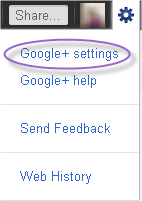
Step 1. Log In to your Google Plus Account and Click on the Settings Wheel Icon and then select Google + Setting Option.
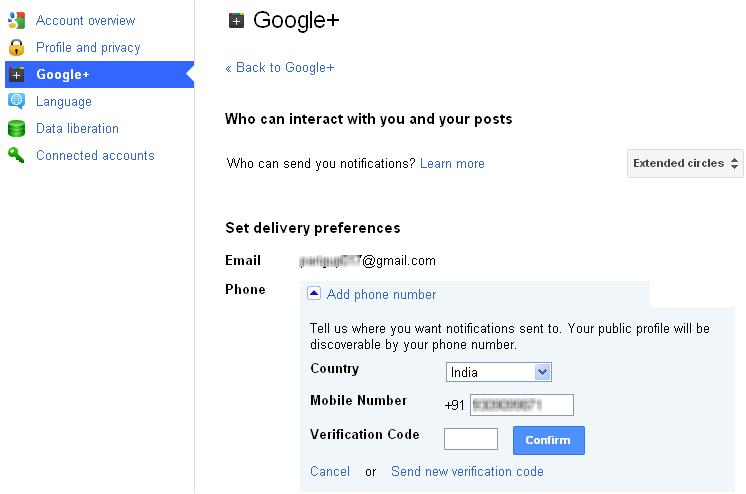
Step 2. Now Click on the Add Phone Number below of Email option in right pan and select your country and enter your Mobile Number without Country code and Click on Send Verification Code button.
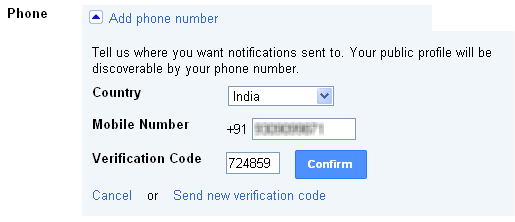
Step 3. You will get an Message on your mobile number with your Verification code.

Enter Verification code and click on Confirm button.
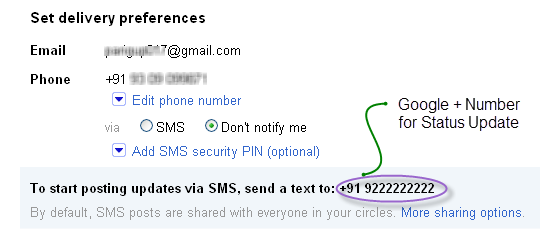
Step 4. Now you phone is connected with your mobile number . Note Down the Google+ Number for Status Update.
Step 5. Now Whenever you want to update your Google + Status, Just Send a SMS to Google plusNumber or +91-92222222222 from your mobile phone.

